Njectify — Your browser, your rules.
Extension for Javascript and CSS Injection.
Customize any website by injecting CSS & JavaScript.
 njectify
What Njectify is
I have always had a slightly annoying habit of tweaking the look and behaviour of the tools and sites I use every day, mostly SaaS products and legacy systems at work.
But anyone who already uses extensions to inject CSS and JavaScript knows how tedious that gets. You open DevTools, make your CSS changes, copy everything into some Stylebot, then open Tampermonkey to inject a script. Logs end up scattered, debugging is painful, and if the page reloads you lose part of your progress or have to redo it all. To make things worse, the experience of using these extensions has basically stood still. The interface is dated, the flow is rigid, and there is no integration that makes the process genuinely pleasant.
I built Njectify out of those frustrations. It is a Chrome extension, on Manifest V3, that brings together everything I needed in one place. Instead of hopping between extensions, it gives you a very fast visual inspector, an advanced CSS editor that feels a lot like WordPress's Elementor, a dedicated debug console, and a full IDE built on Monaco (the same editor behind VS Code) right in the browser. The core idea is simple: you edit CSS and JavaScript live on any website, without opening DevTools and without the page doing that annoying flash every time you save.
Use cases — CSS
If you work in design or frontend development, you know how useful it is to test typography, colours and spacing, or even prototype quickly, straight on a client's page or an internal tool. The Quick Edit panel was built exactly for that: visually changing colours and gradients, typography, layout, borders, shadows, filters, transitions and transform, without writing a line of CSS. And it does not stop at the element's normal state: you edit :hover, :focus, :active, ::before and ::after separately, and each responsive breakpoint has rules of its own. There is unlimited undo/redo within the session, multi-element selection with Ctrl+click, Google Fonts loading right there in the panel, and even exporting your edits as Tailwind classes.
Another classic case is customizing the sites and systems you use every day. That dashboard with an irritating banner taking up half the screen, or that internal system that demands dozens of repetitive clicks for one simple task. With Njectify you can create small projects tied to specific URLs, store API keys securely, and run custom scripts to solve those little everyday annoyances.
 The Quick Edit panel applying a gradient to the TechCrunch homepage. I clicked the hero block, Njectify captured the selector on its own, and the colour editor opened right there: gradient type, angle, stops and the hex, all point-and-click, without a line of CSS. The preview is live, and the change only becomes permanent on that domain once you apply it.
The tool is also extremely useful for anyone doing QA or automation. You can isolate styles, inspect elements, and capture stable CSS selectors with one click, avoiding those random class names generated by modern frameworks.
Use cases — JavaScript
CSS solves what the page looks like. JavaScript solves what it does, and this is where the limit becomes your own creativity. Because the script runs in the page's context, already authenticated and with access to the DOM and the network, you can go far beyond hiding a banner.
| Use case | What you can do |
|---|---|
| Ghost webhook / HTTP interceptor | Override fetch and XMLHttpRequest to mirror every request the site makes to an endpoint of your own. Uncovers any SaaS product's internal API (endpoints, payloads, auth headers) without opening DevTools. |
| API sniffer → client generator | Accumulate the observed endpoints into a schema map (method, path, params, response shape) and export it as a TypeScript client or a Postman collection. You browse the site normally and walk away with the SDK ready. |
| The state persistence the site won't give you | Save filters, drafts, scroll position and half-filled forms to IndexedDB, restoring them when you come back. Kills the rage of losing work in a corporate system with no autosave. |
| A universal keyboard shortcut layer | Map keys to actions that only exist in hidden menus: j/k to move through a list, / to focus search, g+i to jump between screens. Turns any sluggish ERP or dashboard into something you can drive without a mouse. |
| A mutation observer that reacts to the page | Watch the DOM and act on its own: auto-click "load more" until the end, dismiss cookie or newsletter modals, flag a price that dropped, highlight a table row that met some criterion. This is continuous automation, not a one-shot script. |
| Structured extraction + export | Sweep the already-rendered table or list and spit out CSV/JSON via Blob and download, or copy it to the clipboard. Client-side scraping, already authenticated, with no login or anti-bot to deal with. |
| Response mocking and interception | Return a fake payload for specific endpoints, force a 500, delay by 3s, or simulate an empty list. Test your own app's error and loading states without touching the backend. |
| An injected floating debug panel | Your own HUD on the page showing fired events, global variable values, Web Vitals, in-flight requests and localStorage live. A custom, persistent DevTools, always present on that domain. |
Notice what these ideas have in common: none of them needs a backend, a build, or a deploy. You write the script in the IDE, bind it to a URL rule, and it runs on that site from then on. Instead of merely consuming a page, you start shaping it to exactly what you need.
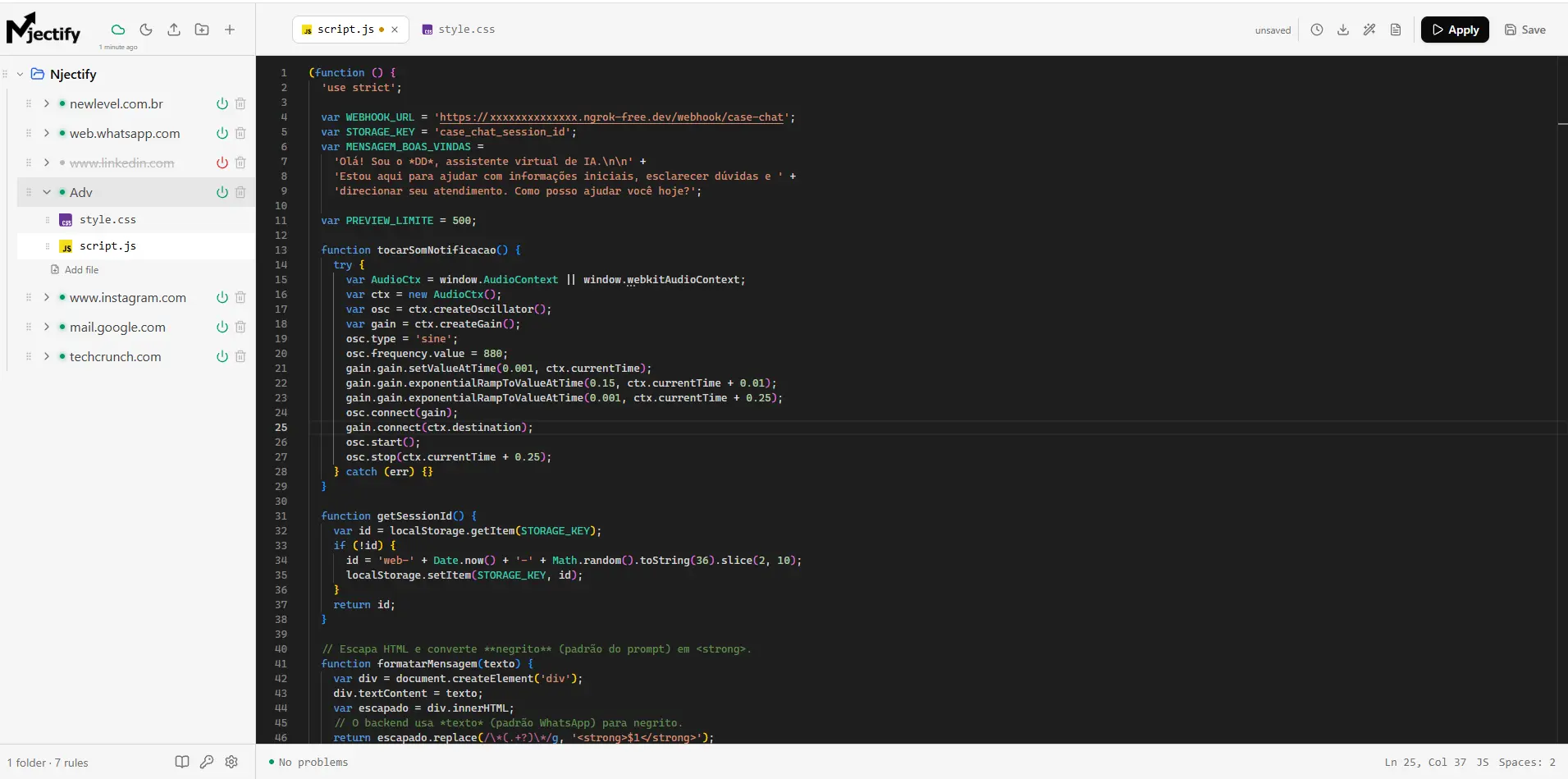 Njectify's IDE, with the Monaco editor and the per-domain rule tree on the left. The open script is a real case: I injected an AI chat into a law firm's website without touching the site's code. script.js builds the widget, keeps the session in localStorage, formats the response and talks to an external webhook, while style.css alongside it handles the looks.
Njectify vs. the competition
I did not build Njectify with the arrogant idea that it came to kill Tampermonkey, Violentmonkey, Stylus or Stylebot. Those extensions are great, they are part of history, and they do their job very well. The point is that they were born in a different era and treat scripting and CSS as isolated hacks.
What sets Njectify apart is that it proposes an integrated flow. The others were born specialised: Tampermonkey and Violentmonkey handle JavaScript, while Stylus and Stylebot handle CSS. To do both on the same site you end up maintaining two extensions, two editors and two separate workflows. Njectify brings it all into a unified suite.
But saying it's integrated
is vague, so here is what I am confident Njectify delivers and that the competitors, each within their speciality, do not offer at the same time:
| Feature | Njectify | Tampermonkey / Violentmonkey | Stylus / Stylebot |
|---|---|---|---|
| JavaScript injection | ✔ | ✔ | ✕ |
| CSS injection | ✔ | ◐viaGM_addStyle | ✔ |
| Point-and-click visual editor | ✔ | ✕ | ✔CSS only |
| Full IDE (Monaco, the VS Code one) | ✔ | ◐basic editor | ◐basic editor |
| Version history you can restore | ✔ | ✕ | ✕ |
| Debug Inspector with its own log | ✔ | ✕ | ✕ |
| Secrets vault for API keys | ✔ | ✕ | ✕ |
| Curated external libraries | ✔10 via CDN | ◐manual@require | ✕ |
| CSS hot reload with no screen flash | ✔ | ✕ | ◐varies |
Editing :hover, ::before and breakpoints | ✔ | ✕ | ◐CSS only, by hand |
A few of these deserve a closer look. The first is the Debug Inspector: instead of clogging the browser's main console with your scripts' logs, Njectify has its own channel that routes messages straight to the IDE's debug panel, showing exactly the source file and line.
Another strong point is persistence. Everything you create is stored locally in IndexedDB, organised into folders, projects and files, and each project carries its own URL rules, by wildcard or regex. The version history keeps snapshots of every file, with a diff, so you can restore any previous state. That layer was designed to be resilient: it prunes the oldest snapshots on its own when space gets tight, and if the quota blows up while saving, the save keeps working instead of breaking in your hands.
And since the focus is real JavaScript, Njectify ships with a curated set of external libraries ready to use via CDN: React, ReactDOM, Vue, jQuery, Lodash, Axios, Day.js, GSAP, Alpine.js and Tailwind. Instead of hunting down CDN URLs and pasting @require by hand, you pick the library from a list and it is injected into your script. To close it out, CSS hot reload (live preview) is instant and does not make the screen blink, which saves a lot of patience over the course of a day.
How AI came into the project
AI came into my workflow as a tool, not a crutch. I was already programming before it, so the technical decisions go through me before they become code: I read and review what is generated, and often rewrite it. It speeds up the work, but the direction is still mine.
Before the first line of code, I started with the harness of my own that I have been assembling over the past few months: a set of instructions, agents and rules that steers the AI within my way of working. Every project of mine starts like that: briefing, requirements gathering and planning before implementation. Deep down, a good prompt is a well-written technical spec, and that depends on knowing exactly what you want to build. In practice, I used Claude as the executing agent and Codex for tests, code review and architecture discussions.
The biggest gain was in the bureaucratic parts: the boilerplate with React 19, TypeScript and Tailwind CSS v4, and the Manifest V3 traps, which means managing the Service Worker and the communication between the extension's contexts. Real decisions came out of those conversations, from messaging to Monaco Editor rendering, each one validated with end-to-end tests in Playwright and manual testing. The frontend was the exception: the whole visual identity, the design system and the interface were built by hand, by me, taking inspiration from Vercel's visual language. That is the part I like to control down to the last detail, so I chose not to use AI there.
Lessons ahead
The project is running really well, but building Njectify taught me a lot and has already given me a clear view of what needs to come next. The main lesson is that ease of use cannot run over the security and stability of the page.
The next priority on the roadmap is a lifecycle runtime for JavaScript scripts. Today, CSS hot reload swaps the style's content in place, with no reload and no flash. JavaScript, on the other hand, is simply re-executed: the listeners and timers from the previous run stay alive on the page and pile up. This runtime will expose a cleanup hook, so each reload tears down the previous state before running the new version.
I also want to unify the selector engine to make element detection smarter and less dependent on dynamic class names, opening the way for a visual macro recorder, where you would just click on the page and the extension would generate the matching script.
Permissions and why they're requested
An extension that injects CSS and JavaScript into any site naturally raises suspicion, and rightly so. That is why I make a point of being transparent about every permission Njectify requests in Manifest V3 and the reason each one exists. Nothing here is asked for just in case
: if a permission is in the manifest, it is because a feature depends on it.
| Permission | Why it is requested |
|---|---|
<all_urls> (access to all sites) | The broadest permission, and the scariest one. Njectify needs to run on any address because the whole point is letting you customize whichever site you want, with no pre-approved list. In practice, it only does something on a page when there is a rule you created for that URL. With no rule, it stays inert. |
scripting and userScripts | The heart of the tool: they let it inject your scripts and styles into the page. userScripts is what enables isolated mode, where your script runs in a world separate from the page's. |
activeTab and tabs | Knowing which tab you are on, applying changes to the right page, and refreshing tabs when you turn a rule on or off. |
storage | Keeping your settings, API keys and preferences in the browser itself. Projects and files live in IndexedDB, and none of it leaves your machine through here. |
identity | Only for the optional Google Drive sync. The scope requested is drive.appdata, a private app folder: Njectify never sees or touches the rest of your Drive files. If you do not enable sync, it does nothing. |
alarms | A daily alarm that does internal cleanup: it deletes old deletion records used by sync, so they do not pile up forever for people who never use Drive. |
The most sensitive point deserves a mention: the API keys and secrets you store in your projects. They are never written inside the script and never travel through the page's window. In isolated mode, your script asks the background for the secret and receives the value over a channel of its own. In fallback mode, where the script shares the page's context, that request is deliberately refused and returns empty: better for the feature not to work there than to expose your key to the site.
Finally, something that should put installers at ease: Njectify only reached the Chrome Web Store after going through Google's review process. Every permission had to be justified, and the extension was analysed to confirm it does exactly what it says, with no malicious behaviour or improper data collection. This is not some extension loose on the internet asking you to take a stranger's word for it; it went through the same rigorous screening as any other officially published on the store.
Summary
Njectify was born out of frustration with the everyday flow of customizing pages: a visual inspector, a point-and-click CSS editor, a debug console and a Monaco-based IDE, all in a single extension. It took around 6 months of development, and the roadmap is still long, but what is live already solves the pain that made me start. I hope it turns out to be useful to you too.
Links
- Install from the Chrome Web Store: Install Njectify
- Official website: njectify.com
- Privacy Policy: njectify privacy policy
- Terms of Service: njectify terms of service