The browser is an underrated development platform
I rebuilt LinkedIn inside and out: the layout, plus a jobs panel that talks straight to their internal API. All of it client-side, to show how much you can actually build inside the browser itself.
I develop on top of every site I visit
An interface delivered in the browser is a suggestion, not a sentence. What reaches you is DOM, CSSOM and a pile of listeners, all assembled on your machine, with your processor, inside a runtime that answers to your commands. Broken visual hierarchy, contrast that would fail any accessibility audit, a flow demanding six clicks for something that should take one: none of it is immutable. It is just the last decision somebody made before deploying. Instead of complaining, I open DevTools and rewrite it.
I started modifying the sites I visit with simple userscripts, using the Tampermonkey extension for JavaScript and Stylebot for CSS, and I stuck with that pair for years. Both do the job, but the experience has aged badly and today it borders on obsolete: the Tampermonkey editor is a textarea with no autocomplete, no element inspection, no version history, and errors only show up in the console after you save. Stylebot hands you a selector and a text field, then good luck winning a specificity fight against a build-hashed class. Neither one is aware of the other: the CSS and the JavaScript for the same tweak live in separate tools, with their own flows and their own storage, sharing no context between them.
The real work ended up happening outside of them: I would inspect in DevTools, build the rule right there, test it, and only then copy it over to the extension, which became little more than a place to keep a file. A small friction, repeated every day, for years. That is where Njectify came from, but that comes later.
It has turned into a bit of a reputation by now: when someone sees my screen for the first time, whether on a call or looking over my shoulder, the first question is almost never about what I am doing, it is why does your LinkedIn/GitHub/Gmail look different from mine?
. The answer is always the same: it is not different for everyone, it is different because I decided it would be. And that is an option every browser gives you.
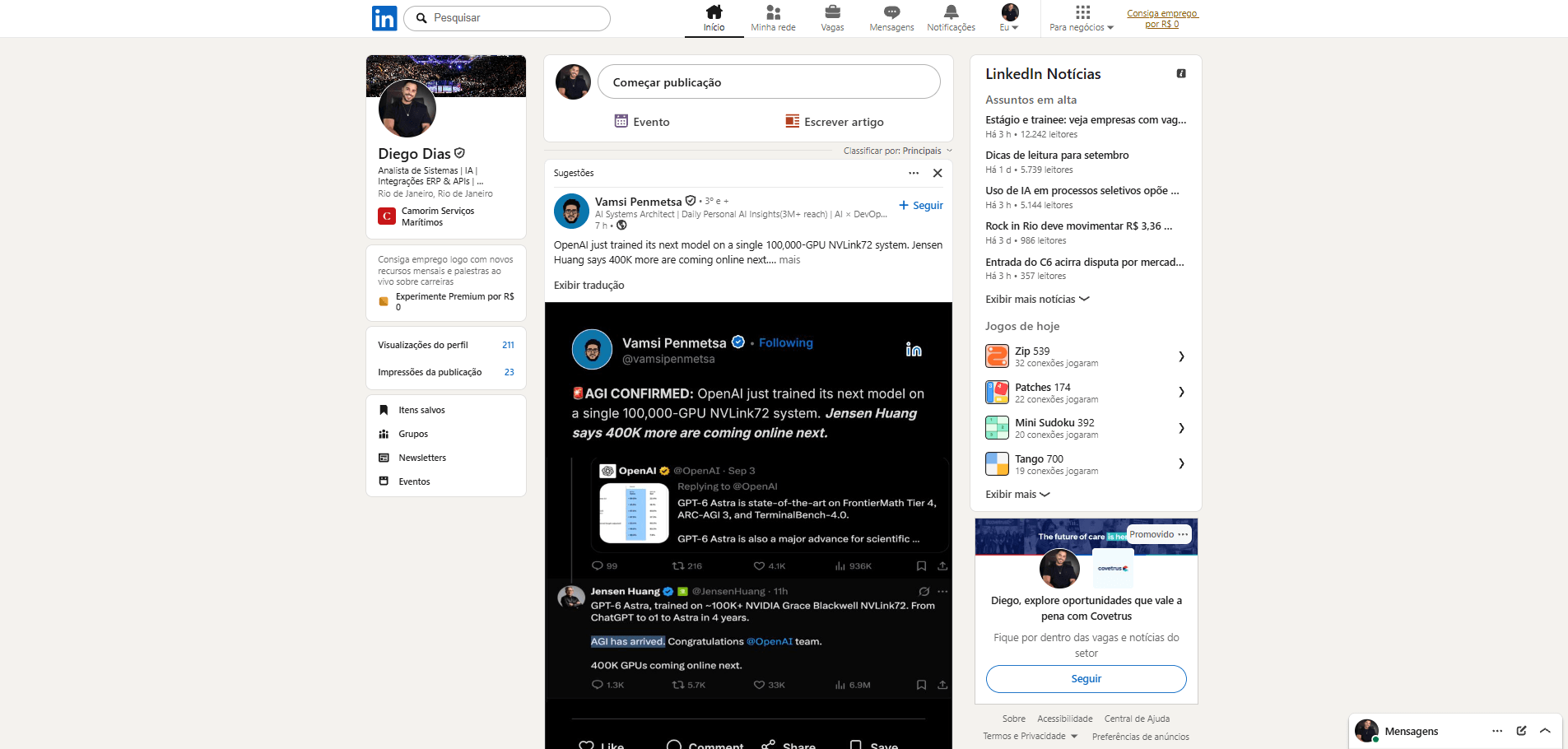
Before and after: the same LinkedIn, two different browsers
I rebuilt the grid into three fixed columns and aligned the navbar to that same axis, fixing horizontal misalignments the original layout was carrying. I normalized the vertical spacing of the cards, corrected alignments that came out crooked between icon, text and border, redid the colour palette and the background, swapped the typography for DM Sans, with more consistent font weights between heading and body, and the icons for Phosphor, turned the jobs panel into collapsible sections with a keyboard-accessible button, and removed Try Premium
, For Business
and the ad card from the interface.
The other front was reclaiming space from things that serve no purpose. Today's games
, with Zip, Patches, Mini Sudoku and Tango taking up an entire card in the right column, was cut. The profile menu, which stacked Saved items
, Groups
, Newsletters
and Events
across four rows with an icon and a label each, became a single row of four icons: same navigation, a quarter of the height. Add that to the ad card and the Premium prompts that were already gone, and there is room left for what I actually open LinkedIn to see.
I have used LinkedIn for years, and it feels like an interface that changes little and slowly. You can sense it on screen: spacings that do not talk to each other, components from different generations living side by side, patterns that have aged, and far fewer UI and UX updates than a social network should get.
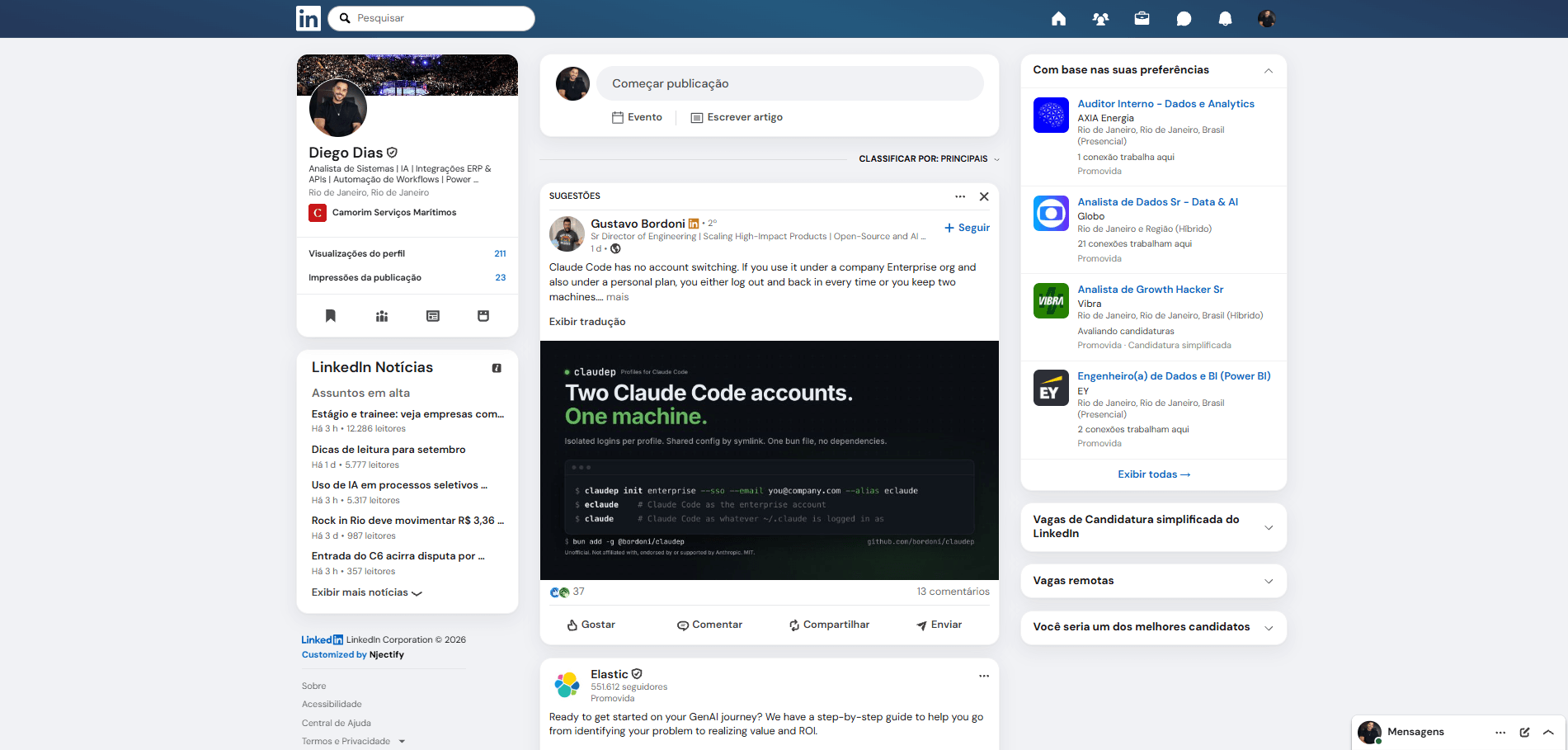
Modernizing this on my end took a few hours. On their end, it would involve an entire product cycle for a gigantic user base, which explains the slowness without making the result any less dated.
And it is not an edited screenshot. It is the real LinkedIn, on my account. I close the tab, come back tomorrow, and it is still like that, right up until the day they decide to touch something and break all of my CSS, because Njectify keeps the script and the CSS bound to the domain.
For all practical purposes, this is the LinkedIn I use. And the visual part, which is the easiest to show, is technically the least interesting of the lot: the Based on your preferences
panel is where it gets good.
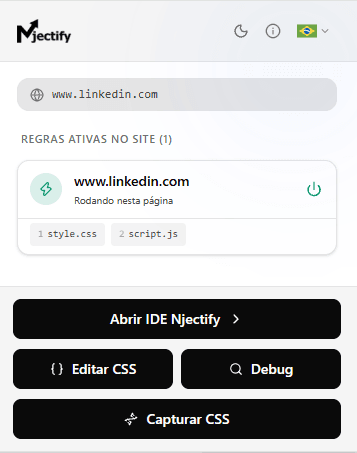 The Njectify popup open on LinkedIn: one active rule for www.linkedin.com, with style.css and script.js running on the page.
What you can learn by poking around the browser
LinkedIn here is just an easy example to show. The point is the method: DevTools open and enough curiosity to visit the Network tab and watch what the site itself exchanges with the server. That is already a form of reverse engineering the application's behaviour, and the window to do it comes open in any browser.
LinkedIn has a /jobs tab with recommendations. My panel does the same thing inside the feed, without changing pages, and to do that it needs to talk to the backend using the same context as the original application.
The first step is to open DevTools, go to Network, filter by graphql and navigate to /jobs. What showed up there was an internal GraphQL API, the Voyager API, at the /voyager/api/graphql endpoint, with calls carrying parameters like variables and queryId — all visible in the capture itself, with no documentation behind it. A single capture already shows the structure of the query that fetches the jobs, including a jobCollectionSlug that names the collection. From there it was brute-force trial and error: I swapped the slug for a guess, fired the call, looked at the response. The sign of failure is not an error — it is 200 OK with an empty list, which is what most of the guesses returned. There is no documentation to consult, so the criterion becomes empirical: if a job came back, the slug exists; if it came back empty, either the name is wrong or the collection does not apply to my account, and there is no way to tell the two apart from outside. The four that made it into the panel (recommended, easy-apply, remote-jobs and top-applicant) are simply the ones that survived that filter.
The second step is where most of these experiments stall: authentication. I do not have a LinkedIn API key, and I do not need one. The user is already authenticated in the browser, the session already exists, and LinkedIn's own normal calls use that context. The value of the JSESSIONID cookie is used as the csrf-token on authenticated calls, and the script reproduces that request inside the same session.
No password is captured and no authentication is bypassed. The data accessed is the same data that would show up in the /jobs tab. The only difference is where it shows up.
That said, it is worth being honest about what this layer is. An internal API has no contract with me: it exists for the site itself, it can change shape or disappear in any given deploy, with no warning and no changelog — and using it is subject to the platform's terms, which changes the conversation quite a bit when the target is a third-party system rather than a personal tool. It is not an integration, it is a fragile dependency I took on knowingly because the cost of breaking is low: if it stops working, I lose a panel in my own feed.
And the most annoying part, curiously, was not the API. It was the DOM.
On the routes I inspected, there are two different navbars. The feed's responds to div[data-testid="primary-nav"] and looks like React. The one on /messaging looks like older Ember: it has no data-testid at all, and the only way to grab it is through the old BEM classes, like global-nav__primary-item — which are, incidentally, the only stable classes on the site: most of the rest are build hashes, and some of the ones I was using have already changed once along the way.
But the worst was a only works after F5
bug. Clicking through the menu to get to /messaging, none of my CSS applied; reloading the page, everything was fine. The reason: when you navigate by click, LinkedIn loads the entire route inside an <iframe src="/preload/?_bprMode=vanilla">. The main document ends up practically empty and the real interface lives in there, while the extension injects into the main document. Since the iframe is same-origin, the way out was to copy my stylesheets into it as soon as it appears.
The as soon as it appears
is the part that takes work. Being an SPA, click navigation swaps the content without reloading anything, so there is no load event to listen for: the iframe simply shows up in the DOM at some point after the click. The solution was a MutationObserver watching the tree, firing the stylesheet copy the instant the element enters — the same technique, incidentally, that solves most my script does not apply after navigating
cases in any application of that kind.
That kind of problem is part of the fun. Once you start treating a third-party application as something observable and extensible, you find out that every product has its own architectural quirks hidden behind the interface.
The ceiling here is much higher than it looks
Up to here it has been a report of what I did. What comes next is the opposite: scenarios the same technique reaches, but that I did not build on LinkedIn. I treat them as hypothesis, not proof.
What I did there is simple next to what the same idea allows. Intercepting a network call is not only useful for observing what it returns: depending on where you intercept, you can create an intermediate layer on the client and change the behaviour the application sees.
In practice, intercepting fetch and XMLHttpRequest can work like a local proxy. A call to a specific endpoint can be redirected, mocked, cached or transformed before it reaches the layer that consumes that data, and the application ends up rendering what you returned, not what the server sent.
The most banal example of this is a dashboard that returns 500 records and insists on paginating 20 at a time. You wrap fetch, let the call go out normally, and on the way back concatenate the pages before handing the JSON to the application. It has no idea it was intercepted: it receives an array bigger than what the server sent in that request and renders the whole table at once.
That panel that shows everything on screen but exports nothing may already have an endpoint returning the complete JSON; all that is missing is the button that turns it into CSV, and the button can be yours.
A legacy system may expose an almost-useful response that is incompatible with the format you need. Instead of standing up a backend, a database, a queue and infrastructure to solve a personal or internal transformation, you can create an adapter on the client that reorganizes that payload inside the session itself.
With WebSocket, the same logic extends to real time. A monitoring system that already receives events over a socket to update the screen can have that same flow listened to by a handler of your own: the events keep going to the application, and in parallel you accumulate, filter and assemble a panel with the slice that matters. It is not new data, it is data that was already passing through with nobody making use of it, and it does not depend on the vendor opening an API for it.
None of this replaces an official integration, nor should it. But there is an enormous category of internal, personal or productivity problem where standing up a server, provisioning infrastructure and maintaining an entire integration is overkill for the size of the pain. Sometimes the code can live exactly where the problem happens.
The financial gain shows up right there. Down the conventional path, a good share of these solutions becomes an integration project, a webhook hosted somewhere, or a feature locked behind a pricier plan. In the browser, depending on the case, it is code running in your own session: no server in the middle, no infrastructure, and no waiting for anyone's approval.
DevTools is your best friend
All of the LinkedIn work came out of three or four features that have been in DevTools for years, and that almost nobody uses as a development tool on top of somebody else's application.
Network was where the Voyager API showed up. With Overrides, that same panel stops merely observing and starts substituting: you map local files over an entire site's resources and reload the page running your code in place of theirs. Snippets stores persistent JavaScript scripts to run in any tab, which is where the jobCollectionSlug guesses lived before becoming an extension.
When you cannot read the code, because it came scrambled to take up less space, the browser unscrambles it: with the source map published, DevTools shows the code as the programmer wrote it, with the original names back. And when you do not even know where to look, the way through is to invert the question — monitorEvents(element) makes the console announce everything that happens to a piece of the screen, you click and see what the page fires. That is how I found more than one handler in code I did not write.
The rest of the panel follows the same logic and fits in one line: Performance and Memory to find out why the tab is slow, Coverage to see how much of what was downloaded never ran, IndexedDB for structured data that survives closing the tab.
You could package all of this into an online course, with an excited name and a promise to unlock the browser. There probably is one already, more than one. And the whole body of material is in Chrome's official documentation, free, one F12 away. These are not secret tricks: they are pieces of a platform we normally use only to open websites.
Where Njectify came from
Njectify was born from the need I mentioned at the start of the post: a Chrome extension on Manifest V3 that brings CSS and JavaScript into the same flow, with a visual inspector, point-and-click CSS editing, an IDE built on Monaco Editor (the same one behind VS Code), its own debug console, a secrets vault, and optional syncing via Google Drive.
At heart it is a Chrome extension for injecting CSS and JavaScript into any site, and how it works is simpler than it sounds. You write a CSS file and a JavaScript file and tell it which address they belong to, in this case www.linkedin.com. The extension keeps those files on your machine and watches the address bar: every time you open that site, it injects your code into the page right after the site loads its own. Yours comes last, so yours wins.
That is why the customization does not disappear. None of it was sent to LinkedIn, nobody on the other side knows it exists, and their server keeps serving the same page to everyone. The difference happens between the response arriving and the screen being drawn, and because that step repeats on every load, the result feels permanent. I close the browser, come back the following week, and there it is. It only breaks the day LinkedIn changes its own code enough that mine can no longer find where to fit.
The LinkedIn redesign is not a separate product: it was built entirely with the extension itself.
The browser was never just a site reader
It is worth looking at the real size of what this experiment demanded, because the list is longer than it looks. There was DOM reading to find the anchor points, CSS resolving specificity against classes that change with every build, a rebuilt grid and typography, JavaScript running inside the page, network traffic observation to understand an API contract nobody documented, GraphQL with parameters discovered through trial and error, reuse of the authentication context that already existed in the session, same-origin iframe manipulation to work around a route that loaded from within, local storage so the tweak survives closing the tab, and an entire debugging cycle to figure out why nothing applied before F5.
It is front-end work, reverse engineering and integration all at once. And none of it needed a server, a special credential, anybody's permission, or a single line of code that was not mine running on my machine. What changes is not the pieces, which were all already there: it is the way of seeing them.
There is a curious situation in the web's architecture: to use a modern application, you have to receive a part of it. Interface, code, structure, resources, state and network calls reach your machine because the browser needs to execute that product.
Most people see that as nothing but implementation. I started seeing it as a development surface, and that is where the difference lies between opening a site and programming on top of it.
From changing a button's colour in 2012 to rewriting a good part of LinkedIn today there is a continuous line. The code reaches your machine to be executed, and for as long as the web has existed, looking at that code has always led someone to want to change it.
Njectify was born of that obsession. Not because a magic API or a hidden vulnerability was missing, but because the pieces to modify the experience were already there. What was missing was organizing them into a tool.
Links
- Get to know Njectify: the full post about the extension
- Install from the Chrome Web Store: Install Njectify
- Official site: njectify.com